 Lavik
LAVIK 0.2.0 · 2026-10-21
Lavik 与采用 SSD 的 Redis 兼容数据库对比
对比 Lavik 与 Dragonfly、Garnet、Apache Kvrocks、Pika、Tendis 使用 SSD 存储时的表现:十亿键、1.024 TB 原始值负载、相同连接数及 p99.9 曲线。
十亿键 × 1 KiB · 16 vCPU · 六块 NVMe SSD · SPDK 对比 RAID0/XFS · 32 客户端线程 · 160–1280 连接 · 每点 60 秒
Lavik 的 GET 与 SET 扫描峰值最高,分别为 1,129,597 与 910,356 QPS。320 连接时,GET 为 652,881 QPS、p99.9 0.943 ms;SET 为 701,241 QPS、0.959 ms。
测试条件与结果解读
160 连接时 Garnet GET 领先:419,982 QPS,对比 Lavik 375,966。本次各同连接数 GET/SET 点中 Lavik p99.9 最低。内存预算、预热与持久化各异;每点仅测一次,1 TB 不含键及存储/索引开销。
从环境到结果:复现路线
- 安装六种指定发布版及 memtier 2.5.1。在同一台 16 vCPU 服务端逐一运行数据库,使用独立客户端。
- 核验专用空设备,为 Lavik 准备 SPDK 和 8 GiB 大页;文件系统对照使用报告的 RAID0/XFS 配置。
- 将 Kvrocks/Pika/Tendis 覆盖配置保存为指定文件,使用提供的脚本叠加至各发布版配置模板。
- 每种系统独立加载十亿键,按要求对 Dragonfly/Garnet 预热,测试 160–1280 个连接,并核对抽样长度、成功操作数、未命中及错误。
下方完整报告提供发布版本、主机条件、服务端配置、加载、预热、测量与验证命令。路径、地址和 PCI 标识来自测试环境,使用前须替换。格式化或清空仅适用于确认无数据的专用测试设备。
相同 320 个连接下的表现
十亿键 × 1 KiB。吞吐量与 p99.9 来自同一测量点。完整扫描及各自峰值见下方报告。
QPS · 越高越好
| 系统 | GET QPS | GET p99.9 (ms) | SET QPS | SET p99.9 (ms) |
|---|---|---|---|---|
| Lavik 0.2.0 | 652,881 | 0.943 | 701,241 | 0.959 |
| Garnet 2.2.1 | 253,433 | 7.167 | 668,406 | 4.415 |
| Dragonfly 2.0.2 | 469,604 | 17.023 | 517,357 | 14.143 |
| Pika 3.5.7 | 202,391 | 4.191 | 94,438 | 8.831 |
| Apache Kvrocks 2.17.0 | 73,587 | 8.383 | 114,683 | 6.047 |
| Tendis 2.8.4 | 121,240 | 4.831 | 137,471 | 7.999 |
在新建 Azure Standard_L16aos_v4 上重新测量 Lavik、Dragonfly、Garnet、Kvrocks、Pika、Tendis。每种产品独立装载 10 亿条 key × 1 KiB value(953.67 GiB 逻辑 value 净载荷),完成 48 个正式测量点。Lavik 的八个点与同批内存数据库对比报告共用,其余五种数据库重新独立装载、测量。
UTC: 2026-10-21T16:55:31.378000+00:00 – 2026-10-22T01:26:24.735000+00:00.
本轮 Lavik 的 GET、SET 扫描峰值均最高,但 160 连接时 Garnet 的 GET 吞吐更高(419,982 对 375,966 ops/s)。在全部相同连接数的 GET/SET 点上,Lavik 的 p99.9 均最低;160 连接 GET 为 0.823 ms,Garnet 为 2.687 ms。上述结论仅描述本轮单次测量及所列配置。
吞吐与 p99.9 延迟
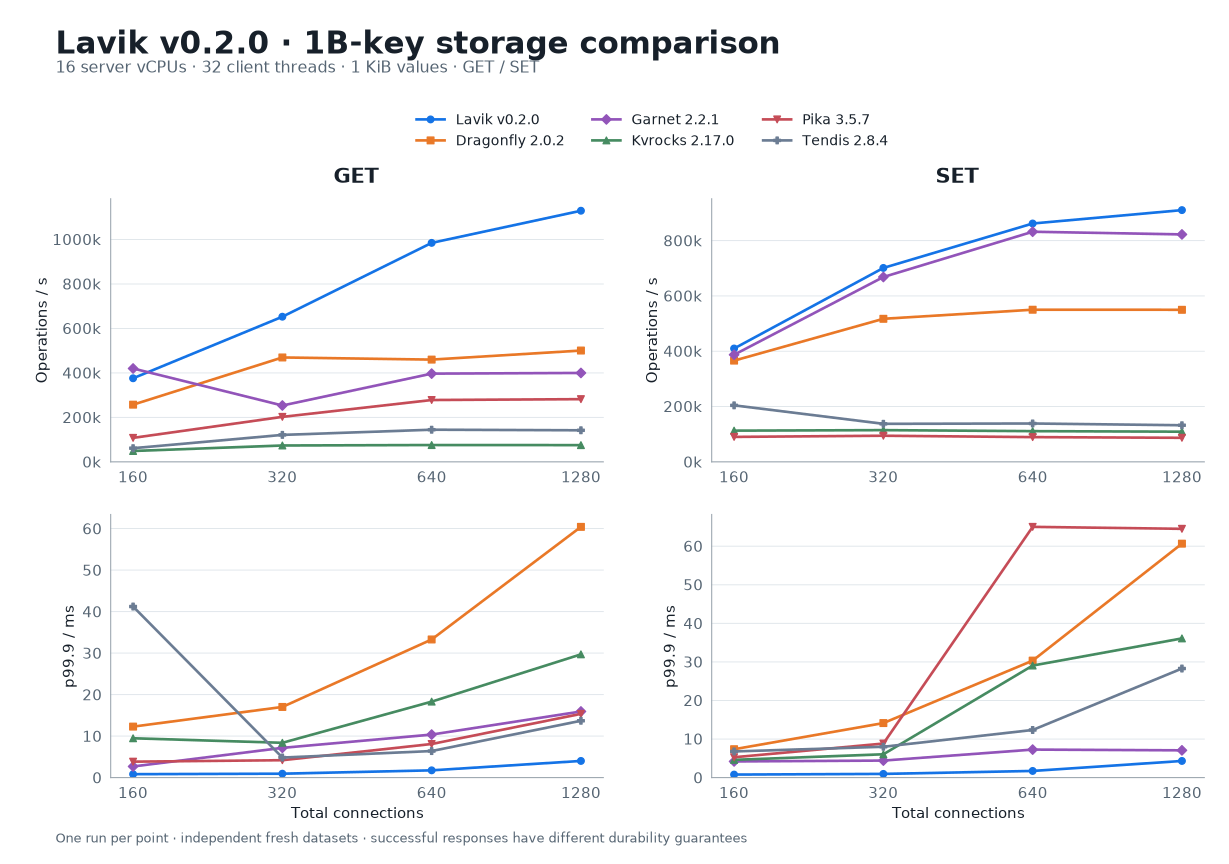
| Command | Product | Peak connections | Peak ops/s | p99.9 ms |
|---|---|---|---|---|
| GET | Lavik v0.2.0 | 1280 | 1,129,597 | 4.015 |
| GET | Dragonfly 2.0.2 | 1280 | 500,682 | 60.415 |
| GET | Garnet 2.2.1 | 160 | 419,982 | 2.687 |
| GET | Kvrocks 2.17.0 | 640 | 75,639 | 18.303 |
| GET | Pika 3.5.7 | 1280 | 281,975 | 15.359 |
| GET | Tendis 2.8.4 | 640 | 144,571 | 6.399 |
| SET | Lavik v0.2.0 | 1280 | 910,356 | 4.319 |
| SET | Dragonfly 2.0.2 | 640 | 550,147 | 30.335 |
| SET | Garnet 2.2.1 | 640 | 832,135 | 7.263 |
| SET | Kvrocks 2.17.0 | 320 | 114,683 | 6.047 |
| SET | Pika 3.5.7 | 320 | 94,438 | 8.831 |
| SET | Tendis 2.8.4 | 160 | 204,258 | 6.783 |
峰值可能来自不同连接数;以下为相同连接数的 ops/s / p99.9 ms。
| Command | Connections | Lavik v0.2.0 | Dragonfly 2.0.2 | Garnet 2.2.1 | Kvrocks 2.17.0 | Pika 3.5.7 | Tendis 2.8.4 |
|---|---|---|---|---|---|---|---|
| GET | 160 | 375,966 / 0.823 | 257,252 / 12.287 | 419,982 / 2.687 | 48,895 / 9.471 | 107,938 / 3.839 | 61,462 / 41.215 |
| GET | 320 | 652,881 / 0.943 | 469,604 / 17.023 | 253,433 / 7.167 | 73,587 / 8.383 | 202,391 / 4.191 | 121,240 / 4.831 |
| GET | 640 | 985,019 / 1.751 | 459,905 / 33.279 | 396,838 / 10.367 | 75,639 / 18.303 | 278,178 / 8.095 | 144,571 / 6.399 |
| GET | 1280 | 1,129,597 / 4.015 | 500,682 / 60.415 | 399,895 / 15.935 | 75,255 / 29.695 | 281,975 / 15.359 | 141,987 / 13.695 |
| SET | 160 | 409,886 / 0.783 | 366,038 / 7.359 | 387,296 / 4.191 | 112,843 / 4.607 | 90,218 / 5.279 | 204,258 / 6.783 |
| SET | 320 | 701,241 / 0.959 | 517,357 / 14.143 | 668,406 / 4.415 | 114,683 / 6.047 | 94,438 / 8.831 | 137,471 / 7.999 |
| SET | 640 | 861,911 / 1.727 | 550,147 / 30.335 | 832,135 / 7.263 | 111,034 / 29.055 | 89,450 / 65.023 | 138,691 / 12.351 |
| SET | 1280 | 910,356 / 4.319 | 549,937 / 60.671 | 822,427 / 7.071 | 109,065 / 36.095 | 86,950 / 64.511 | 132,374 / 28.287 |
客户端与内存诊断
| Product | Max average client CPU / cores | Max thread average / cores | Post-point RSS / MiB | Max server steal / % |
|---|---|---|---|---|
| Lavik v0.2.0 | 17.971 | 0.579 | 47,998–48,012 | 0.0000 |
| Dragonfly 2.0.2 | 12.166 | 0.450 | 86,260–95,177 | 0.0000 |
| Garnet 2.2.1 | 15.661 | 0.511 | 115,481–115,830 | 0.0000 |
| Kvrocks 2.17.0 | 2.598 | 0.134 | 35,740–50,235 | 0.0000 |
| Pika 3.5.7 | 6.455 | 0.349 | 34,770–58,832 | 0.0000 |
| Tendis 2.8.4 | 4.456 | 0.164 | 45,683–79,879 | 0.0000 |
客户端预算为 32 个 CPU;RSS 为正式点之后的进程快照范围,Lavik 另有 8 GiB 大页预留。
环境、配置与方法
| Item | Configuration |
|---|---|
| Server | Standard_L16aos_v4; Japan East zone 2; AMD EPYC 9V74; 8 physical / 16 logical CPUs; 128 GiB nominal RAM |
| Client | Standard_F32als_v6; memtier 2.5.1; 32 threads on CPUs 0–31 |
| OS | Ubuntu 24.04; Linux 6.17.0-1022-azure on both hosts |
| Storage | 6 × 1,919,850,381,312 B local NVMe; Lavik SPDK; peers RAID0/XFS/noatime |
| Network | Private VNet; kernel TCP; accelerated networking; data address 10.96.1.4 |
| Workload | Decimal keys 1..1,000,000,000; 1,024-byte values; random GET or overwriting SET; independent client seeds |
| Window | 60 seconds per point; 32 client threads; 160 / 320 / 640 / 1280 connections |
各产品在同一服务器串行运行,分别独立装载数据。先 GET、后 SET,每组按连接数递增测量。Dragonfly 和 Garnet 额外用 32 个客户端线程、160 连接预热 GET 180 秒;其他产品沿用原方法,不额外预热。所有构建在测量前完成。正式点均零连接错误,正式 GET 均零未命中;每次装载完成精确 10 亿次 SET,扫描前后抽样检查 value 长度。
Lavik defrag 全程启用;Garnet 使用 Lookup compaction,RocksDB 自动压缩保持启用。配置内存预算不同:Dragonfly 96 GiB;Garnet 64 GiB log、32 GiB read cache、16 GiB index;Kvrocks 80 GiB block cache;Pika 24 GiB block cache 与 32 GiB 应用缓存;Tendis 72 GiB 共享缓存。这些是预算,不是实测总 RSS。
持久化路径不同:Lavik 使用 SPDK 存储;Dragonfly 使用分层文件,不做周期快照;Garnet 使用 storage log,不启用 AOF;Kvrocks、Tendis 关闭 WAL,Pika 关闭 binlog。成功响应不代表相同同步持久性。每点只测一次,不给置信区间。历史 1B 测试使用 16 个客户端线程并包含 80 连接;本次使用 32 线程、四档连接数,Dragonfly/Garnet 额外预热也改为 32 线程、160 连接;本次在 Japan East、旧测试在 Japan West。
对比产品版本与 0.1.0 报告一致:Dragonfly 2.0.2、Garnet 2.2.1(.NET 10.0.12)、Kvrocks 2.17.0、Pika 3.5.7、Tendis 2.8.4-rocksdb-v8.5.3。Pika 官方包内嵌版本显示 3.5.6,revision 为 62a57f85534198e0d1033c32f1215c958bef8a5e。
装载记录
| Product | Client invocation wall time / min | Reported fill ops/s |
|---|---|---|
| Lavik v0.2.0 | 21.6 | 940,654 |
| Dragonfly 2.0.2 | 24.4 | 820,369 |
| Garnet 2.2.1 | 25.3 | 798,058 |
| Kvrocks 2.17.0 | 112.8 | 163,321 |
| Pika 3.5.7 | 208.5 | 82,423 |
| Tendis 2.8.4 | 82.6 | 209,462 |
All points · Provenance · Validation · 原始日志与测量凭据
装载墙钟耗时包含连接建立、客户端统计汇总及结果回传。
运行命令
以下使用 Bash,按实际环境替换地址和安装路径。安装上述发布包及 memtier 2.5.1。每次只运行一个数据库,启动命令保持前台运行,干净停止后再启动下一个。文件系统步骤只使用经过核验的六块空临时盘。Lavik 独立灌入前,按 SPDK 存储指南准备专用设备和 8 GiB hugepages。
配置块仅包含相对测试版本配置模板的覆盖项。分别保存为注释指定的 .overrides 文件,再执行覆盖脚本;各系统使用同一套客户端负载。
Storage and paths
# Filesystem peers: six verified, empty local NVMe devices, kernel driver bound.
# These names are placeholders: replace each with a verified scratch device.
DEVICES=(/dev/TEST_NVME1 /dev/TEST_NVME2 /dev/TEST_NVME3
         /dev/TEST_NVME4 /dev/TEST_NVME5 /dev/TEST_NVME6)
sudo mdadm --create /dev/md/bench --level=0 --raid-devices=6 "${DEVICES[@]}"
sudo mkfs.xfs /dev/md/bench
sudo mkdir -p /mnt/bench020
sudo mount -o noatime /dev/md/bench /mnt/bench020
sudo mkdir -p /mnt/bench020/{dragonfly,garnet,kvrocks,pika/{db,log,dump,dbsync},tendis/{db,log,dump}}
sudo chown -R "$(id -u):$(id -g)" /mnt/bench020
ulimit -n 65535
Lavik SPDK
# Prepare the six verified SPDK namespaces using the SPDK storage guide.
# Use the actual PCI addresses after binding the empty scratch devices to VFIO.
BDFS=(7133:00:00.0 10fc:00:00.0 9c4a:00:00.0 ef09:00:00.0 fa44:00:00.0 9816:00:00.0)
FILES=(); EAL=''
for bdf in "${BDFS[@]}"; do
  FILES+=(--data-file="spdk://${bdf}/1")
  EAL+=" -a ${bdf}"
done
sudo prlimit --memlock=unlimited:unlimited --nofile=65535:65535 env BYCORF_EAL_ARGS="$EAL" BYCORF_DPDK_MEMORY_MB=8192 \
  taskset -c 0-15 /opt/lavik-v0.2.0-linux-x86_64/lavik \
  --storage=spdk --bind=10.96.1.4 --shutdown-checkpoint --tomb-raider-interval-ms=0 \
  --spdk-max-completions-per-poll=16 --log-dir=/mnt/dev/bench-lavik-logs \
  "${FILES[@]}"
Dragonfly 2.0.2
taskset -c 0-15 /opt/dragonfly/dragonfly-x86_64 \
  --logtostderr --bind=10.96.1.4 --proactor_threads=16 --maxmemory=96GB \
  --dir=/mnt/bench020/dragonfly --dbfilename= \
  --tiered_prefix=/mnt/bench020/dragonfly/tier \
  --tiering_disk_storage_initial_size=64GB --tiered_max_file_size=2TB \
  --backing_file_direct=false --tiered_offload_threshold=1.0 \
  --tiered_experimental_cooling=false --tiered_max_pending_stash_bytes=16MB
Garnet 2.2.1
cd /opt/garnet/net10.0
export DOTNET_ROOT=/opt/dotnet
export LD_LIBRARY_PATH="$PWD${LD_LIBRARY_PATH:+:$LD_LIBRARY_PATH}"
# The release archive places its native device library at the package root.
mkdir -p runtimes/linux-x64/native
ln -sf ../../../libnative_device.so runtimes/linux-x64/native/libnative_device.so
ln -sf /lib/x86_64-linux-gnu/libaio.so.1t64 libaio.so.1

taskset -c 0-15 ./GarnetServer \
  --bind 10.96.1.4 --protected-mode false --memory 64g --page 4m \
  --index 16g --index-max-size 16g --storage-tier \
  --logdir /mnt/bench020/garnet/log --checkpointdir /mnt/bench020/garnet/checkpoints \
  --readcache --readcache-memory 32g --no-obj --no-pubsub \
  --device-type Native --device-io-backend Libaio --device-throttle-limit 512 \
  --initial-io-record-size 8k --compaction-freq 300 --compaction-type Lookup \
  --compaction-force-delete --minthreads 16 --miniothreads 16
Kvrocks
# kvrocks.overrides
bind 10.96.1.4
port 6379
workers 16
tcp-backlog 8192
db-name kvrocks-perf
dir /mnt/bench020/kvrocks
log-dir stdout:warning
log-level warning
slowlog-log-slower-than -1
slowlog-max-len 0
persist-cluster-nodes-enabled no
enable-blob-cache yes
rocksdb.block_cache_size 81920
rocksdb.max_open_files -1
rocksdb.write_buffer_size 512
rocksdb.target_file_size_base 512
rocksdb.max_write_buffer_number 8
rocksdb.min_write_buffer_number_to_merge 2
rocksdb.max_background_jobs 16
rocksdb.max_subcompactions 4
rocksdb.max_total_wal_size 8192
rocksdb.wal_ttl_seconds 3600
rocksdb.wal_size_limit_mb 65536
rocksdb.compression no
rocksdb.compression_start_level 0
rocksdb.enable_pipelined_write yes
rocksdb.level0_file_num_compaction_trigger 16
rocksdb.level0_slowdown_writes_trigger 128
rocksdb.level0_stop_writes_trigger 256
rocksdb.enable_blob_files yes
rocksdb.min_blob_size 1000
rocksdb.blob_file_size 1073741824
rocksdb.level_compaction_dynamic_level_bytes no
rocksdb.max_bytes_for_level_base 68719476736
rocksdb.write_options.disable_wal yes
rocksdb.rate_limiter_auto_tuned no
Pika
# pika.overrides
port : 6379
thread-num : 16
thread-pool-size : 32
log-path : /mnt/bench020/pika/log/
db-path : /mnt/bench020/pika/db/
dump-path : /mnt/bench020/pika/dump/
pidfile : /mnt/bench020/pika/pika.pid
db-sync-path : /mnt/bench020/pika/dbsync/
max-subcompactions : 4
write-binlog : no
max-write-buffer-size : 8G
compression : none
max-background-jobs : 12
max-background-flushes : 4
max-background-compactions : 8
block-cache : 24G
num-shard-bits : 6
share-block-cache : yes
cache-index-and-filter-blocks : yes
pin_l0_filter_and_index_blocks_in_cache : yes
optimize-filters-for-hits : yes
cache-maxmemory : 34359738368
Tendis
# tendis.overrides
bind 10.96.1.4
port 6379
daemon off
logLevel warning
logdir /mnt/bench020/tendis/log
dumpdir /mnt/bench020/tendis/dump
dir /mnt/bench020/tendis/db
pidfile /mnt/bench020/tendis/tendisplus.pid
slowlog /mnt/bench020/tendis/log/slowlog
tcp-backlog 8192
netIoThreadNum 4
executorThreadNum 16
executorWorkPoolSize 4
binlog-enabled no
binlog-save-logs no
rocks.blockcachemb 73728
rocks.blockcache_num_shard_bits 8
rocks.blobcache_in_blockcache yes
rocks.disable_wal yes
rocks.compress_type none
rocks.write_buffer_size 268435456
rocks.target_file_size_base 536870912
rocks.max_bytes_for_level_base 68719476736
rocks.level0_file_num_compaction_trigger 16
rocks.level0_slowdown_writes_trigger 128
rocks.level0_stop_writes_trigger 256
rocks.max_background_jobs 16
rocks.max_subcompactions 4
rocks.compaction_readahead_size 2097152
rocks.enable_pipelined_write 1
rocks.cache_index_and_filter_blocks 1
rocks.pin_l0_filter_and_index_blocks_in_cache 1
rocks.partition_filters 1
rocks.enable_blob_files 1
rocks.min_blob_size 1000
rocks.blob_file_size 1073741824
rocks.enable_blob_garbage_collection 1
rocks.blob_garbage_collection_force_threshold 0.5
# Overlay the changes above on the tested release's configuration template.
# Paths: /opt/kvrocks/kvrocks.conf, /opt/pika/conf/pika.conf, /opt/tendis/tendisplus.conf.
python3 - <<'CONFIG'
from pathlib import Path
import re
for product, template in [('kvrocks', '/opt/kvrocks/kvrocks.conf'),
                          ('pika', '/opt/pika/conf/pika.conf'),
                          ('tendis', '/opt/tendis/tendisplus.conf')]:
    separator = r'\s*:\s*' if product == 'pika' else r'\s+'
    changes = {}
    for line in Path(product + '.overrides').read_text().splitlines():
        if line.strip() and not line.lstrip().startswith('#'):
            key = re.split(separator, line.strip(), maxsplit=1)[0].lower()
            changes[key] = line
    lines = []
    for line in Path(template).read_text().splitlines():
        stripped = line.strip()
        key = re.split(separator, stripped, maxsplit=1)[0].lower() if stripped else ''
        if stripped.startswith('#') or key not in changes:
            lines.append(line)
    Path(product + '.conf').write_text('\n'.join(lines + list(changes.values())) + '\n')
CONFIG

# Start only the selected product, with an empty data directory.
taskset -c 0-15 /opt/kvrocks/build/kvrocks -c kvrocks.conf
taskset -c 0-15 /opt/pika/bin/pika -c pika.conf
taskset -c 0-15 /opt/tendis/bin/tendisplus tendis.conf
Client: load, warm up and measure
# Run on the separate client. Use a new OUT directory for each server.
SERVER=10.96.1.4
PRODUCT=dragonfly  # lavik, dragonfly, garnet, kvrocks, pika, tendis
OUT="results/$PRODUCT"
mkdir -p "$OUT"
ulimit -n 65535
COMMON=(--server="$SERVER" --threads=32 --key-minimum=1
        --key-maximum=1000000000 --key-prefix= --data-size=1024)

taskset -c 0-31 memtier_benchmark "${COMMON[@]}" --clients=20 \
  --requests=1562500 --ratio=1:0 --key-pattern=P:P \
  --json-out-file="$OUT/fill.json"

# Check sampled value lengths; do not scan the full keyspace.
for key in 1 2 500000000 999999999 1000000000; do
  test "$(redis-cli -h "$SERVER" --raw STRLEN "$key")" = 1024
done

if [[ "$PRODUCT" == dragonfly || "$PRODUCT" == garnet ]]; then
  taskset -c 0-31 memtier_benchmark "${COMMON[@]}" --clients=5 \
    --test-time=180 --distinct-client-seed --command='GET __key__' \
    --command-is-read --json-out-file="$OUT/warmup.json"
fi

for op in GET SET; do
  if [[ "$op" == GET ]]; then
    COMMAND=(--command='GET __key__' --command-is-read)
  else
    COMMAND=(--command='SET __key__ __data__')
  fi
  for connections in 160 320 640 1280; do
    taskset -c 0-31 memtier_benchmark "${COMMON[@]}" \
      --clients="$((connections / 32))" --test-time=60 --distinct-client-seed \
      "${COMMAND[@]}" --json-out-file="$OUT/$op-c$connections.json"
  done
done